01 / LOGGING
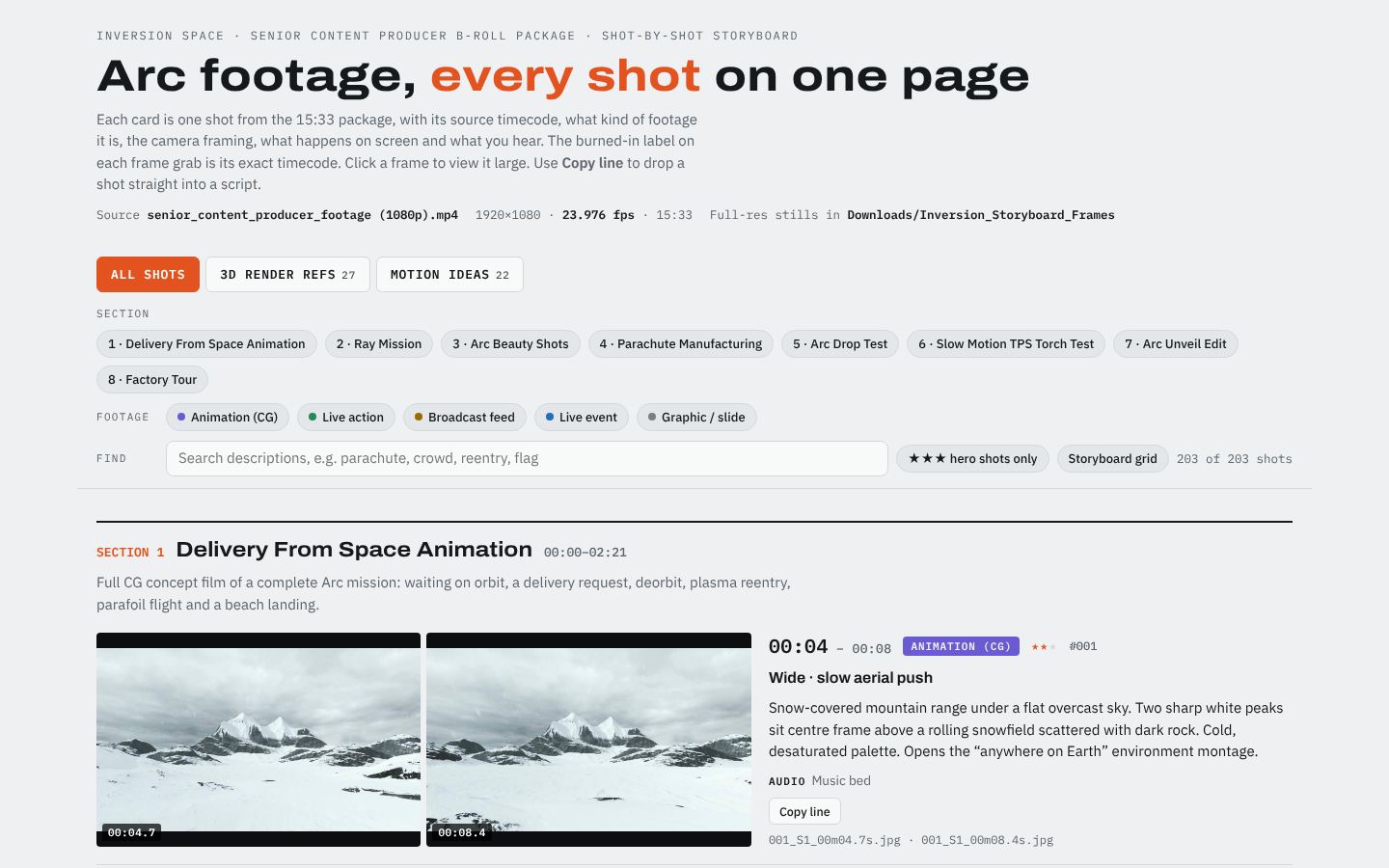
Storyboard
The 15:33 source broken into 203 shots with timecode, shot type, descriptions and frame grabs. Working tabs held 27 3D references and 22 motion ideas.
Open Storyboard →FORT / FILM / CREATIVE TECHNOLOGY · OCTOBER 2026
An Inversion Space sizzle, and the production system behind it: editorial judgment, custom review tools, controlled generation, code-rendered motion and designed sound.
The film, the working tools, and the production process behind them.
THE JOB
The brief was a one-minute film cut from Inversion’s footage to the final minute of Floating Points’ Falaise. Generated scenes, motion graphics and sound design would extend the edit while staying tied to the source material.
The working method treats each bottleneck as a small, explicit problem: a shot log to understand the footage, a tapper to find the rhythm, a run sheet to control generation, and deterministic graphics that can be checked frame by frame.
THE FILM
WEB PLAYBACK COPY: 60.03 S · 910 × 512 · 30 FPS · H.264 / AAC
DOCUMENTED EDIT TARGET: 1920 × 1080 · 23.976 FPS · PREMIERE PRO
MUSIC: FALAISE / FLOATING POINTS
PURPOSE-BUILT TOOLS
Four working snapshots from the edit. Explore the storyboard, change selects, load a tapped take or annotate a frame. Changes stay in this tab and reset on reload; the original production data is unchanged. Cut Tapper accepts your own audio locally. The Edit List is documented below, but its app was not included.
01 / LOGGING
The 15:33 source broken into 203 shots with timecode, shot type, descriptions and frame grabs. Working tabs held 27 3D references and 22 motion ideas.
Open Storyboard →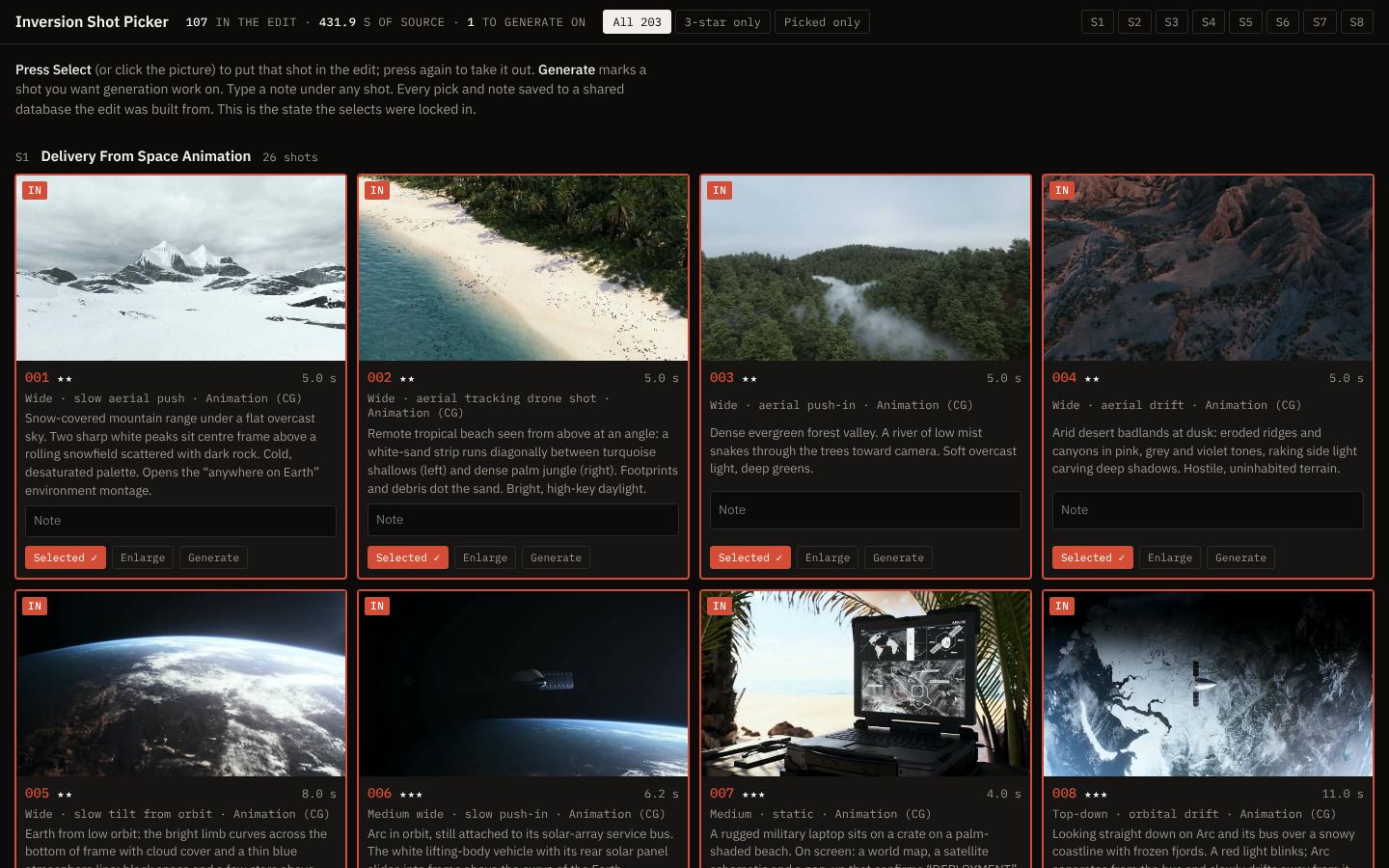
02 / SELECTS
A contact sheet for selections, ratings and shot notes. 107 picks represented 432 seconds of source. Notes became a brief for the specials.
Open Shot Picker →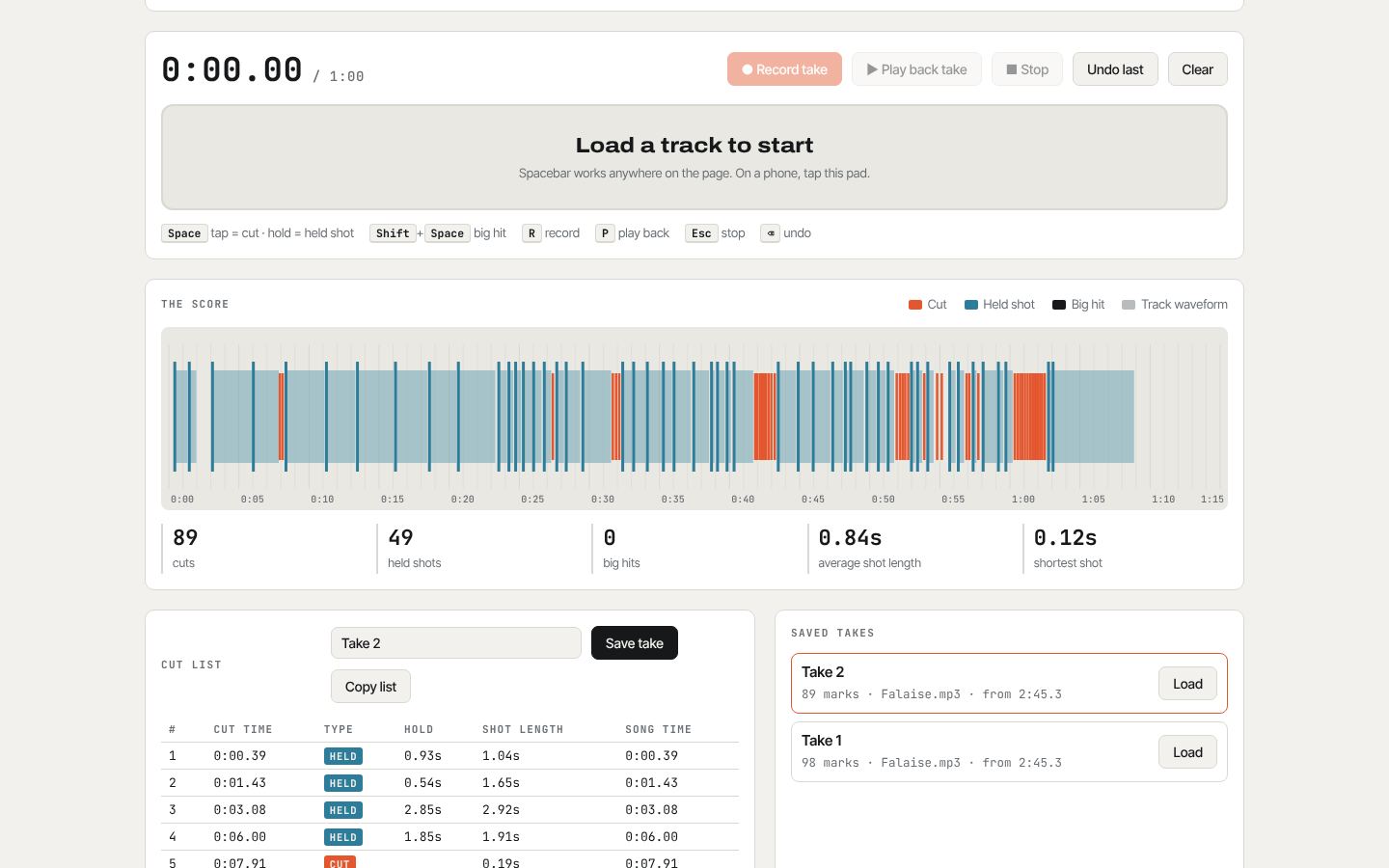
03 / RHYTHM
Tap the spacebar for a cut; hold for a sustained shot. Saved takes preserve the rhythm so the technical workflow can render it.
Open Cut Tapper →04 / ASSEMBLY
Seven sequences with shot order, source, planned duration, music-hit alignment and a running clock.
WORKFLOW DOCUMENTED · EDIT LIST APP NOT SUPPLIED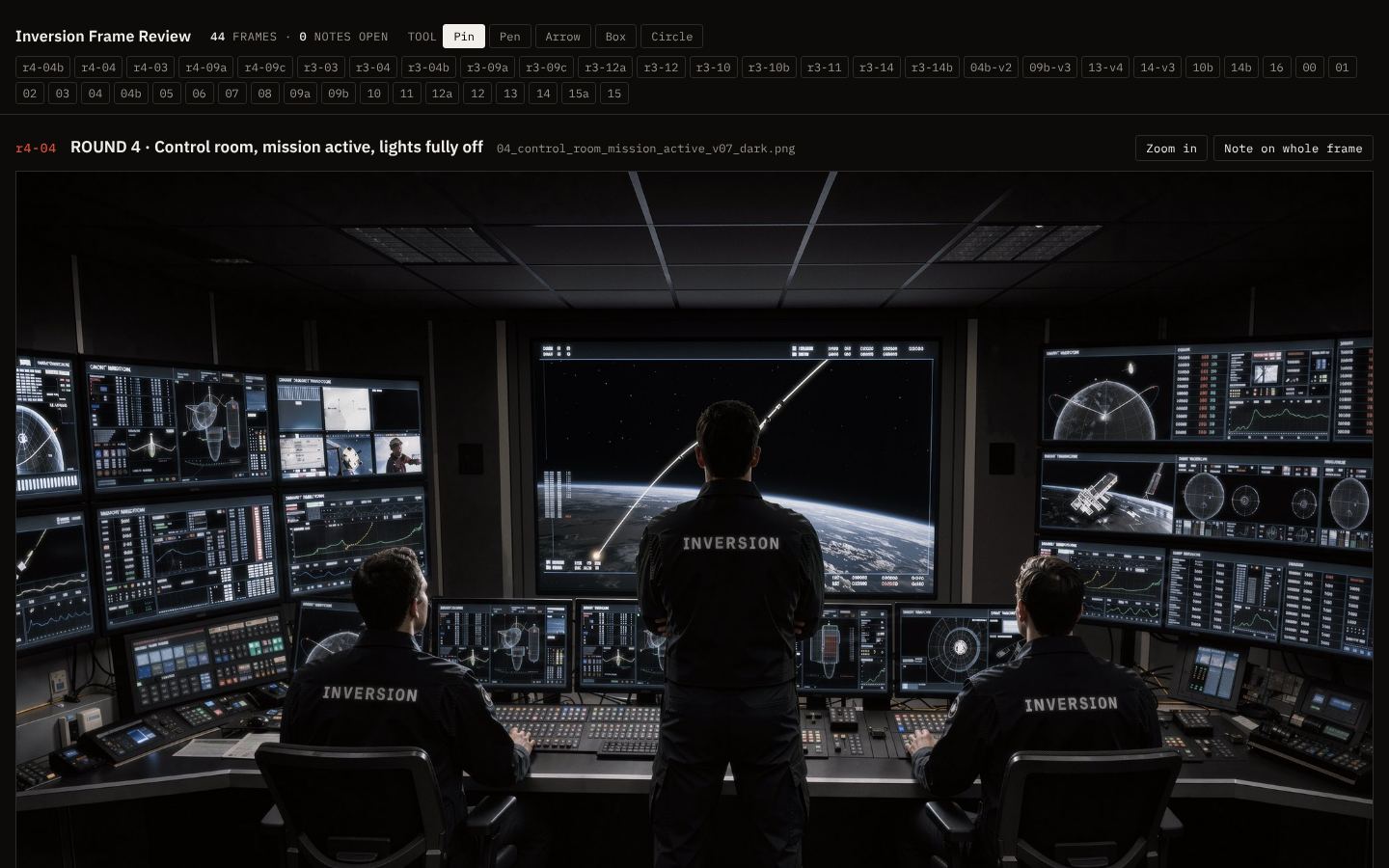
07 / GENERATION
Pinned or drawn notes on generated frames feed the next run sheet, keeping review tied to a specific image and iteration.
Open Frame Review →00 / PIPELINE
Nothing in a later stage starts until the earlier one is approved. The expensive steps (generation, final renders) sit late, after timing and look are locked.
01 / SETUP
Creative decisions and technical work were split into separate Claude chats inside one project. The project docs are the handoff: decisions get written down before anything gets built.
Chat A · Creative
Chat B · Technical & generative
| Doc | What it holds |
|---|---|
| Technical handoff | Read first. What exists, where it lives, edit facts, open briefs, deadline triage, status log. |
| Generation rulebook | Working rules, reference index, prompt formats, model notes and test log. Reused on every project. |
| Creative guide | Ten principles and a repeatable process for technical-visual work. |
| Motion workflow & brand file | Render pipeline, brand tokens, house motion rules, graphics backlog. |
| Elements brief / 3D insert brief | The work list for specials, filler, HUD and the matched-pass 3D approach. |
| Source selects | The 107 picked shots by section, with notes that became the specials list. |
| Higgsfield elements | Project, folders and every registered element. |
| SFX sourcing brief | A self-contained job sheet any person or chat can pick up and run. |
| Error log | Every protocol miss: what happened, the cost, the rule broken, the fix. |
02 / FOOTAGE TO ROUGH CUT
The 15-minute source became a searchable shot library, then a set of selects, then three rendered rough cuts locked to the music.
Tool: Storyboard →
Output: Shot list CSV, 369 grabs
Gate: Complete log
Tools: Shot Picker →, Frame Review (tool described above)
Output: Selects doc + specials list
Gate: Director's picks
Selected edit-time markers: 20.3, 24.2, 29.3, 34.4, 39.4 (climax), 44.5, 47.9, 51.1, 53.0 and 56.3 seconds; hard stop at 60.0 seconds.
Tool: Cut Tapper →
Pulse: 0.4165 s
Rule: Cut 2 frames early
edl.json):
shot, in, out, position.render.py <take> cuts the segments and joins
them; mix.py <take> lays the music, radio lines and
hum under it. Three 60-second takes rendered: two tap-driven, one
flowing.Tools: Python, ffmpeg
Output: 3 takes + XML
Editor: Premiere Pro
03 / SYSTEM
Brand tokens and foundation sheets come before any hero shot. Every later prompt, graphic and cut points back at them, which is what keeps sixty seconds of mixed sources looking like one film.
House motion rules. Elements build in a stagger, never fade as a block. Numbers always count. Thin 1.5–2 px lines and bracket corners, no glow, no lens flares. One accent colour. Transitions are transformations, not dissolves. Every reveal lands on a hit.
Accent: #D44D36
Settle ease: .22,1,.36,1
Move ease: .77,0,.175,1
Motif: 2.3 px dotted grid
Platform: Higgsfield
Elements: 16
Gate: Each sheet vs the real thing
04 / GENERATE
Generation is the expensive, unpredictable step, so it's the most controlled. Stills are approved before any video, and every run is approved line by line.
Video tier 1 · Ideation
Every test and first pass: Kling 3.0 pro, 5 seconds. Change one thing at a time until the motion is approved.
Video tier 2 · Final
4K, a pricier model or an upscale runs only on a shot already approved at tier 1, and only when asked for that shot. Resolution comes last.
05 / MOTION GRAPHICS
HUDs, the logo resolve and the signal graphic aren't generated video. Claude writes them as a web page, renders every frame, and delivers a transparent master that drops straight onto the timeline.
seek(t) function draws any frame from time alone,
with seeded randomness, so every render is identical and any frame can
be checked.PARAMS object holds copy, palette, duration and hit
markers, so a change is one edit.Spec: 1920×1080, 23.976
Master: ProRes 4444 alpha
Transfer: VP9 alpha .webm
Font: Brand mono
| Piece | Length | Behaviour |
|---|---|---|
| Logo end card | 5.0 s | Dotted-grid dots drift in and snap into the wing mark on hit one (1.28 s); the letters' dots snap on hit two and the real wordmark SVG locks on top (2.85 s); readable hold; hard black at 5.00 s. Alpha and opaque versions. |
| Reentry HUD | 8 s | Telemetry in the brand mono face. Numbers marked illustrative unless confirmed. |
| Signal acquired | ~3 s | Brackets snap, mono text types on, a single red indicator. Opens the piece. |
06 / SOUND
The sound plan was written as a standalone brief: 78 rows by section, each with ID, shot, source, search terms and priority. Tonal and music-locked sounds are built in code; everything else is fetched.
Source order
Hard rules
The showpiece sound, built in layers so each can be mixed against the pulse:
| Layer | What |
|---|---|
| Body | A pulsejet running (naturally chuggy and buzzing), or real rocket ignition into sustained burn |
| Character | One animal, close and low: big-cat growl or a very close purr |
| Edge | Gas torch or pressure blast, bright and hissy |
| Ignition | A single whoomp with crackle |
| Shutdown | Engine cut, then metal ticking as it cools |
| Sub + gate | Built in code, locked to the 0.4165 s pulse |
About 36 sounds under half a second, each with a sharp start: servo zips, relay clicks, telemetry chirps, pneumatic puffs, ratchets, arc zaps, glitch bursts, shutter snaps, power blips, metal pings, stepper stutters, a breaker thunk for the lights-up jump, and real shop tools from the footage.
# a timed line from the source file
ffmpeg -ss 431.6 -to 436.9 -i "source.mp4" -vn -ar 48000 -c:a pcm_s24le \
  "05_SOUND/01_PROD/INV_ORB-03_dispatch-three-two-one_a.wav"

# the whole audio of one clip
ffmpeg -i "<clip>" -vn -ar 48000 -c:a pcm_s24le "05_SOUND/01_PROD/INV_<ID>_<desc>_a.wav"
07 / CUT AND FINISH
Shots stay slow and readable; pace comes from cutting. Transitions are cuts and transformations, kept inside the house rules.
Deadline triage. With under 24 hours left, everything outside the cut was paused and the build list cut to three items in a fixed order: logo end card, HUD, signal graphic. The paused work stays in the briefs to resume after delivery.
08 / TOOLKIT
The scripts, setups and references that sit behind the pages above.
Rough cut
EDL in, rendered take out, with music, radio lines and hum mixed under it.
→ MP4 + FCP7 XML + EDL
Edit prep
Clips transcoded and binned by section, delivery bins, three ready timelines with markers.
→ edit folder
Brand
Vector logos, font roles, colour and easing tokens, brand sheet, house motion rules.
→ every graphic and prompt
Graphics
HTML frames rendered headless and encoded to alpha masters, with a contact sheet and import test.
→ ProRes 4444 alpha
References
The documented workflow gathers reference posts, captions and extracted details into one library for later creative research.
→ techniques, presets, links
| Job | Tool |
|---|---|
| Planning, briefs, builds | Claude: two chats in one project, shared docs |
| Stills | Higgsfield: Nano Banana Pro, Flux 3 |
| Video | Higgsfield: Kling 3.0 (ideation tier), finals only on approved shots |
| Motion graphics | HTML / Canvas / SVG / Three.js, Playwright, ffmpeg |
| Rough cuts and audio pulls | Python, ffmpeg, beat analysis |
| Edit, sound placement, grade | Premiere Pro |
| Sound sources | Client footage, royalty-free bundles, CC0 recordings |
09 / RULES
Written during the project, most of them after something went wrong. Every miss was logged with what it cost and the rule that fixes it, so the rulebook carries to the next project.
01
No work without a confirmed order. What, in what order, and what it's for. A change of topic is not a go.
02
Catch up first. Read the creative chat and every project doc before technical work.
03
Plan, one test, frames, the rest. Never run the whole thing straight away.
04
Know what we already have. If an existing frame is the thing, say so before generating.
05
Every generation has references. One to four, each with a stated role.
06
Reference approval is its own step. Numbered pictures with reasons, then stop.
07
Every reference is tagged. Origin, role and use, always.
08
Quote before, report after. Cost before every run; the transaction record, not the balance readout, is the truth.
09
Worker, not creative voice. Creative calls are made in the creative chat and written down.
10
Report honestly. What failed and why, next to the real footage.
11
Continuity check before every run. List every knock-on change a note causes.
12
Run sheet before every run. Change, prompt, references, model, cost.
13
A go covers only the sheet it answers. No waiver carries to the next run.
14
Nothing outside the notes. New ideas go on the sheet as options only.
15
Dropped means gone. Off every later sheet, page and overview.
16
Ideation tier first. One cheap clip, one change at a time, until motion is approved.
17
Final tier only on approved shots. Fix at the cheap tier; resolution comes last.
18
No model comparisons unless asked. One model per test.
10 / TEMPLATES
The formats, folders and names used throughout. Reusable on any project.
[What to make, one line: subject + view]
[Role of each reference: "Image 1 is … Image 2 is … only"]
[What must match exactly: shape, proportions, markings, colours]
[Setting and background]
[Lighting: source, direction, hardness]
[Camera: body, lens, angle, depth of field]
[Materials and surface detail]
[Finish: photoreal render / film stock / grade]
# 30–80 words. Lead with a verb. Positive phrasing only: write "empty floor"
# rather than "no stand". Hex codes tied to objects. Exact text in quotes.[Verb + the one thing that changes]
[Everything that stays exactly the same, named]
[New background or light, if any]
# One change per pass.Shot: [framing and what the shot is]
Camera: [body, support, one move]
Lens: [focal length, character, depth of field]
Action: [one action, with direction and path]
Light: [source, direction, quality, time of day]
Texture: [grain, atmosphere, grade]
Holds: [what stays fixed: positions, geometry; not people]
# Describe motion, not the picture. A 5 s clip gets one action, one move, one mood.
# Use a start frame only where the scene needs motion.ID | What changes | Exact prompt | References (numbered) | Elements attached
| Where it runs | Model + tier | Cost | Continuity knock-onsEdit/
01_FOOTAGE/ source shots by section and number
02_MUSIC/
03_GFX/ brand file, delivered graphics
04_GENERATED/ A_Signal B_Hero C_Mech D_HUD E_Segments F_Transitions
05_SOUND/
01_PROD/ 02_HARD_FX/ 03_BOOSTER/ 04_AMB/ 05_FLASH_KIT/ 06_RAW_LIBRARIES/ 07_DESIGN_CODE/
sfx_log.csv id, filename, source, url, licence, author, cost, notes
# Generated: <section><#>_<desc>_v01 e.g. D2_hud-reentry_v02
# 3D passes: ARC3D_<piece>_<pass>_v01 e.g. ARC3D_teardown_wire_v01
# Sound: INV_<ID>_<desc>_<a|b|c>.wav e.g. INV_SIG-04_dish-servo-whine_a.wav
# Keep every version. Save the prompt and reference numbers beside each result.